快速判断
- 01这个 Skill 是干嘛的
- 把资料、对话和工作记录归档成可检索的结构化知识。
- 02它能解决什么问题
- 解决长期项目的信息散落、关键决策丢失和之后无法快速找回上下文的问题。
- 03它适合谁来用
- 适合需要持续沉淀项目知识、研究材料和对话记录的个人与团队。

预览 · README.md
中文为 README 译文;English 保留 GitHub README 原文。
<p align="center"> <a href="./README.md">English</a> · <strong>简体中文</strong> </p>
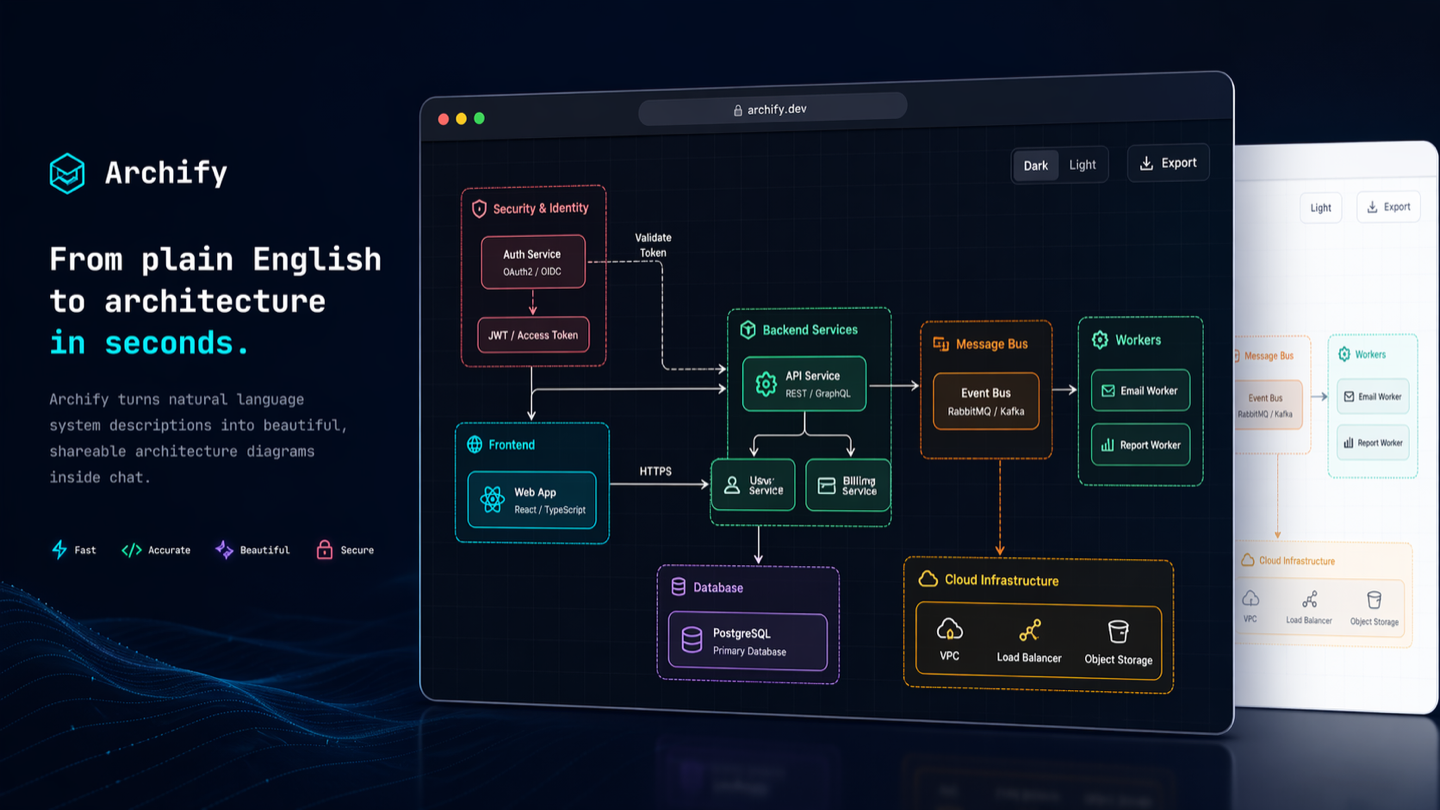
Archify
聊两句就画出好看的架构图、技术流程图、调用时序图、数据流图和生命周期图。深色 / 浅色一键切。导出最高 4× 清晰 PNG / JPEG / WebP / SVG,或直接复制到剪贴板。
Archify 是一个可用于 Claude、Codex CLI 和 opencode 的 agent skill:你用大白话描述自己的系统或流程,它就把你的描述变成一张做工精细的技术图 —— 一个单文件 HTML,在浏览器里打开就能切主题、复制到剪贴板、导出成各种图片格式。
- 不需要会画图 —— 把组件和连接关系说给 Claude 就行
- 支持 workflow / sequence / data flow / lifecycle —— 技术流程、审批链、工具调用、CI/CD、请求调用链、数据管线、PII 边界、状态机都可以画
- 内置主题切换 —— 深色 / 浅色一键切,浏览器记住偏好
- 一键复制到剪贴板 —— 直接贴到 Slack、飞书、微信、Notion、GitHub issue
- 导出图片超清晰 —— PNG / JPEG / WebP 全部由浏览器在最高 4× 源分辨率下原生光栅化(不是位图放大,没有糊),或导出 SVG 做真矢量
- SVG 自动跟系统深浅色 —— 导出的 SVG 内嵌两套变量 +
@media (prefers-color-scheme),贴到 GitHub README 里,读者切深浅色图跟着切(不用两张 PNG +<picture>包起来) - 内置质量闭环 —— renderer 驱动的图会经过 JSON schema 校验、布局检查、HTML/SVG artifact 检查,再做定向迭代
- 语义技术标签 —— 可以把组件写成
aws.lambda、postgres、redis、github-actions、openai等;Archify 会把它们映射到合适的视觉类别,不需要完整图标库 - 单文件 HTML —— 生成的 HTML 零运行时依赖,发一个文件就能分享
- 聊天迭代 —— "把 Redis 挪到左边"、"鉴权服务换成玫红"、"加个 Kafka"


在线落地页 → tt-a1i.github.io/archify
60 秒开始:
npx skills add tt-a1i/archify -g然后告诉你的 agent:使用 archify 梳理这个仓库的运行时架构。
预览
同一张图,两套主题,一键切换:
| 深色 | 浅色 |
|---|---|
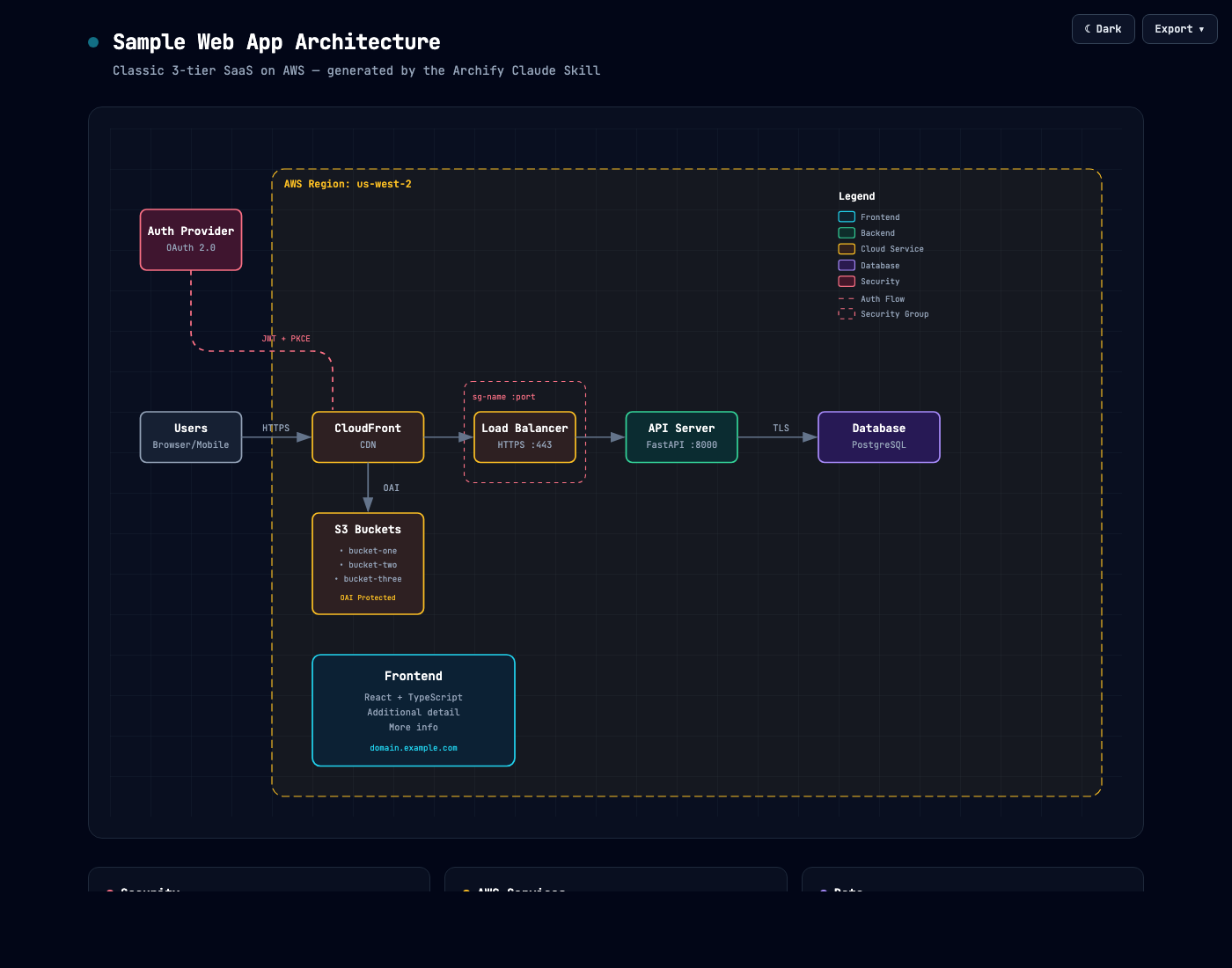 | 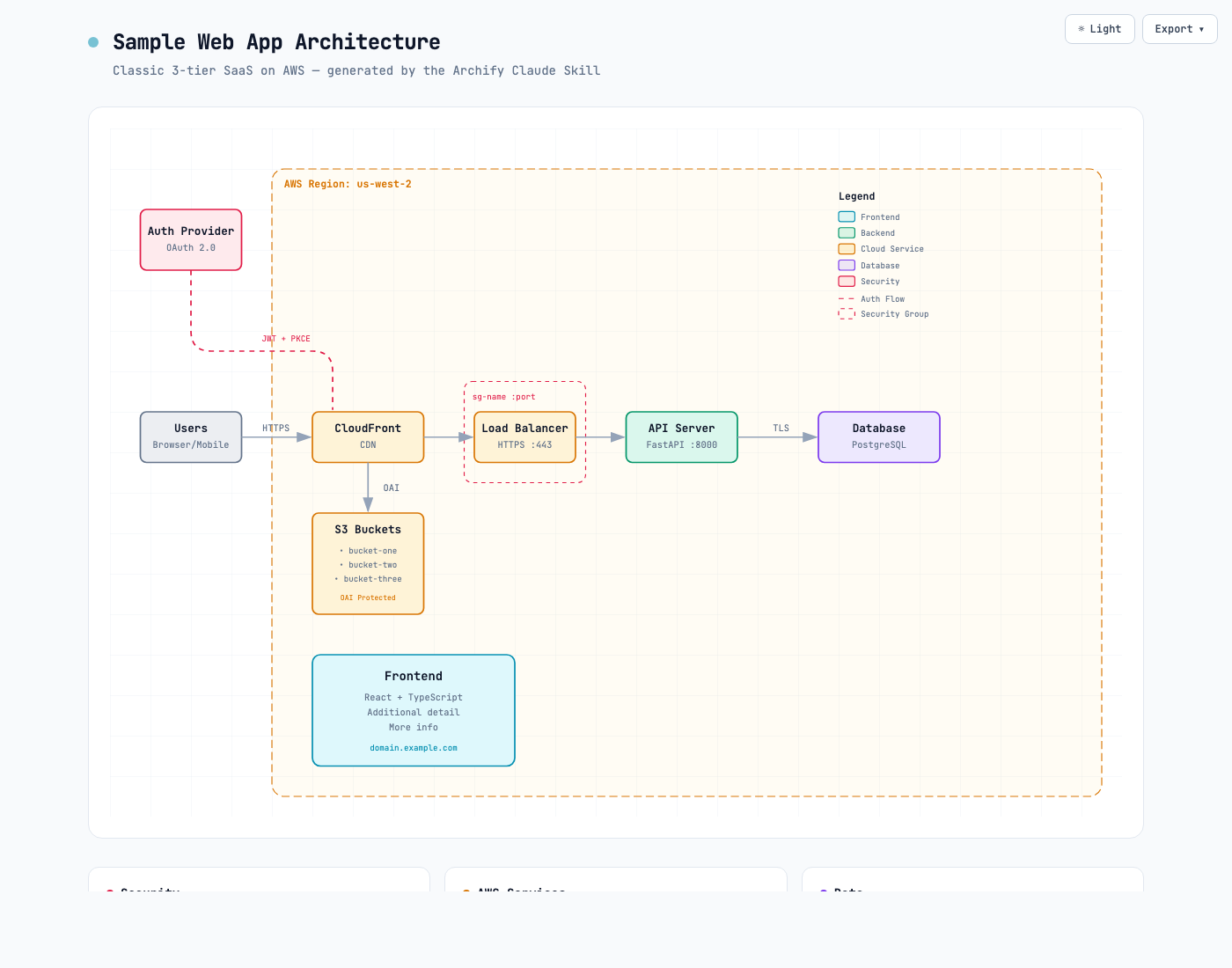 |
Export 菜单 —— 复制到剪贴板 + 四种格式下载:
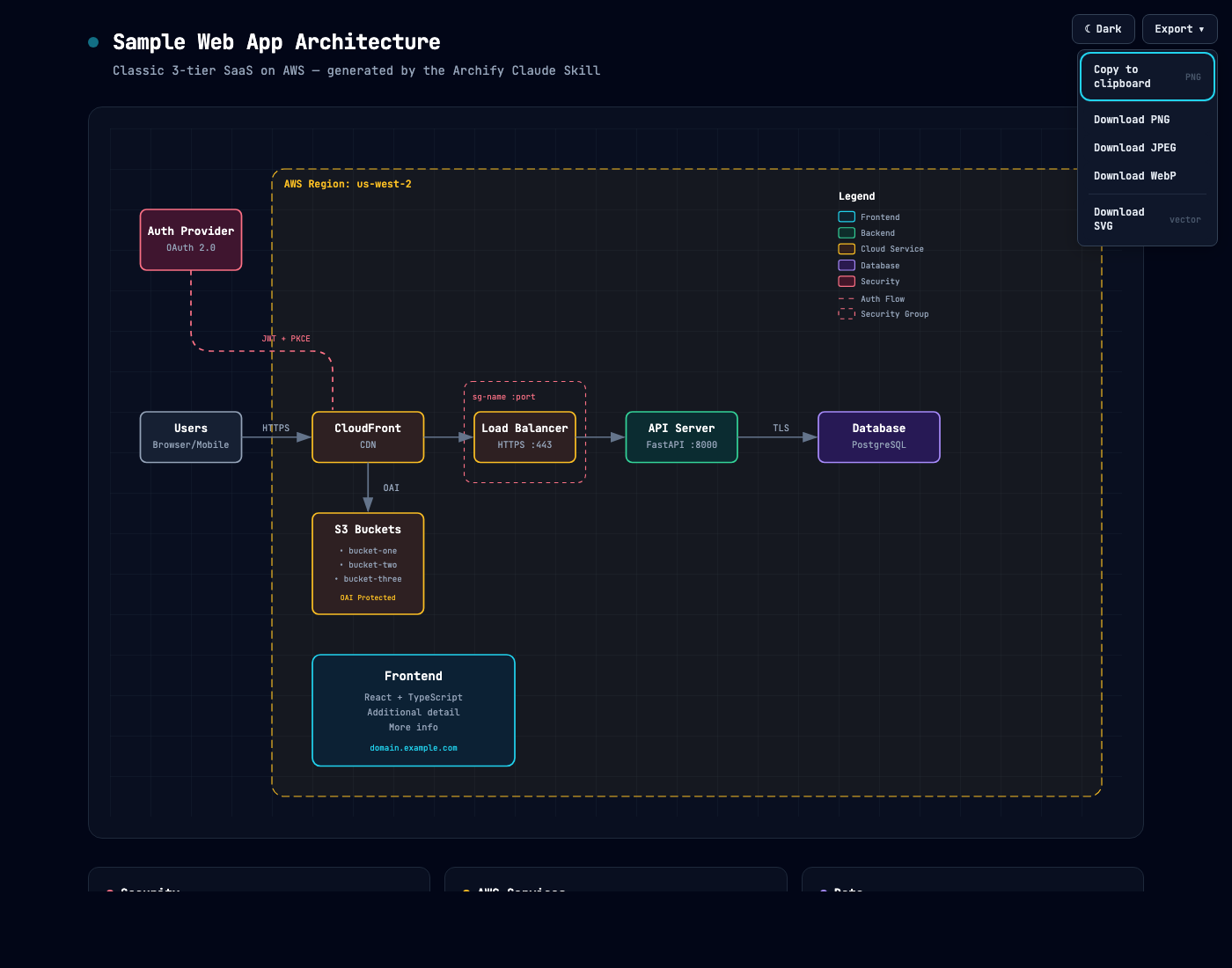
想亲自体验:下载或克隆仓库后打开 examples/web-app.html。按 <kbd>T</kbd> 切换主题,按 <kbd>E</kbd> 打开导出菜单。
快速开始
1. 安装
npx skills add tt-a1i/archify -g这条命令通过开源的 skills CLI 为支持的 Agent 安装 Archify。
如果只想临时体验,不做永久安装:
npx skills use tt-a1i/archify@archify --agent codex需要时可以把 codex 换成 claude-code 或 opencode。
2. 先画一个边界清楚的视图
不要一开始就要求一张图解释整个仓库。先从 Overview 开始:
分析这个仓库,然后使用 archify 生成一张高层运行时架构图。
只保留 8–12 个核心组件,突出一条主要请求或数据路径,并标出外部依赖与信任边界。
辅助信息放进说明卡片,不要继续增加连线。
如果只想解释一条调用链:
使用 archify 画出这条登录流程:Browser -> Web App -> API -> JWT 校验 ->
Redis Session 查询 -> PostgreSQL 回源。把缓存未命中作为次要路径。
3. 在对话中细调
只要当前会话里仍保留源 JSON,就可以继续说:增加 Redis、把鉴权移到左侧、突出回滚路径。
最终得到的是一个可直接在现代浏览器中打开的 HTML 文件,并可导出 PNG、JPEG、WebP 或 SVG。
图表类型
先确定你想回答的问题,再选择对应视图:
| 类型 | 最适合 | Prompt 中应包含 |
|---|---|---|
| Architecture | 组件、服务、存储和系统边界 | 范围、核心组件、主要路径 |
| Workflow | CI/CD、审批、工具调用、runbook | 参与者、顺序、分支、异常 |
| Sequence | API 调用、缓存回源、鉴权和异步链路 | 调用方、被调用方、返回和时序 |
| Data Flow | 数据管线、血缘、PII 和下游消费 | 来源、转换、存储、敏感边界 |
| Lifecycle | 状态机、等待、重试和终态 | 状态、事件、重试与取消路径 |
Architecture 示例:
examples/web-app.html— 精简 SaaS 架构examples/archify-repo.html— Archify 的 Skill → JSON IR → Renderer 流水线examples/archify-repo-grid.html— 显式row/col网格布局examples/maka-architecture.html— 第三方桌面 Agent 工作台
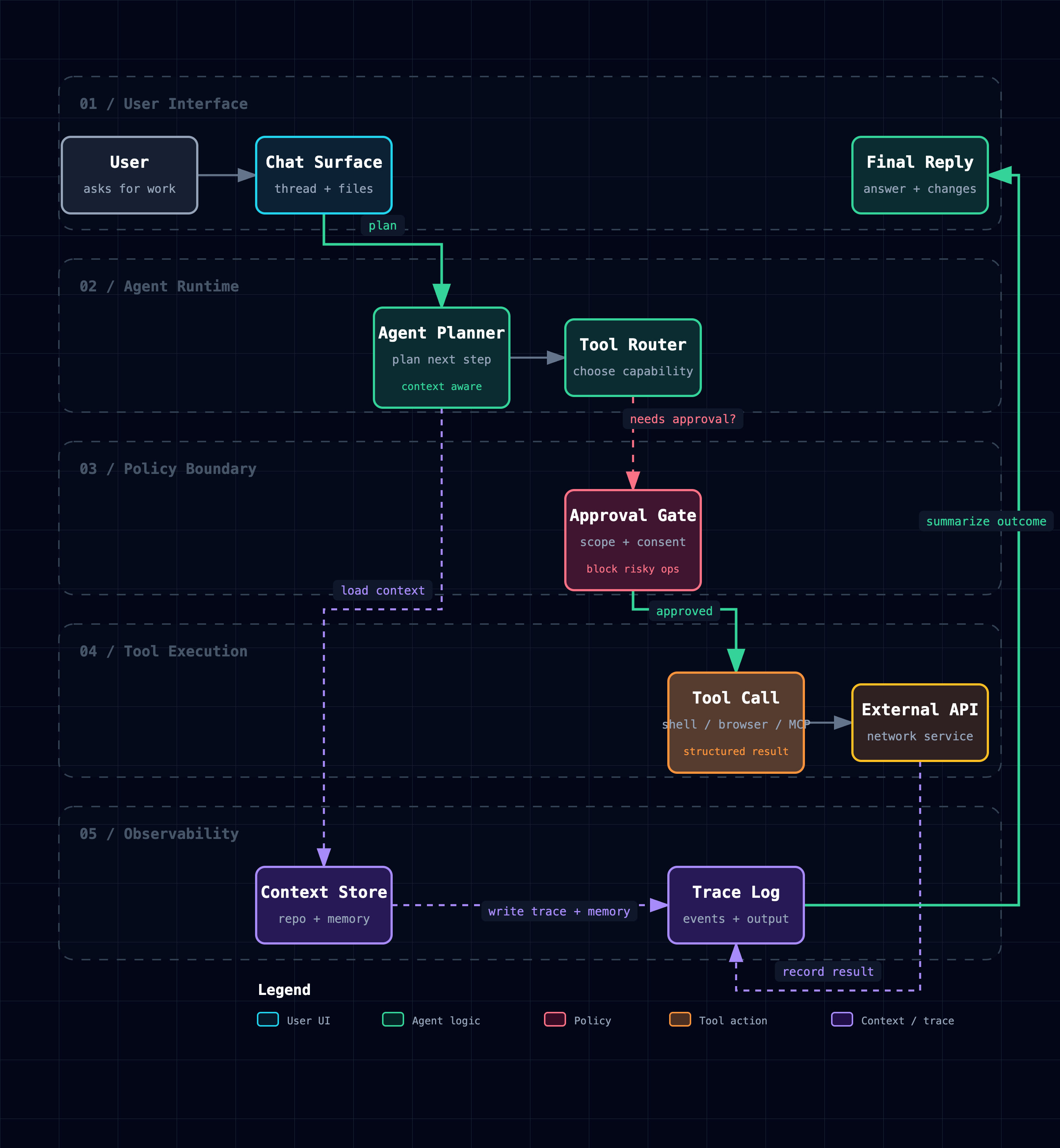
Workflow 使用泳道、清晰主路径和克制的次要分支。
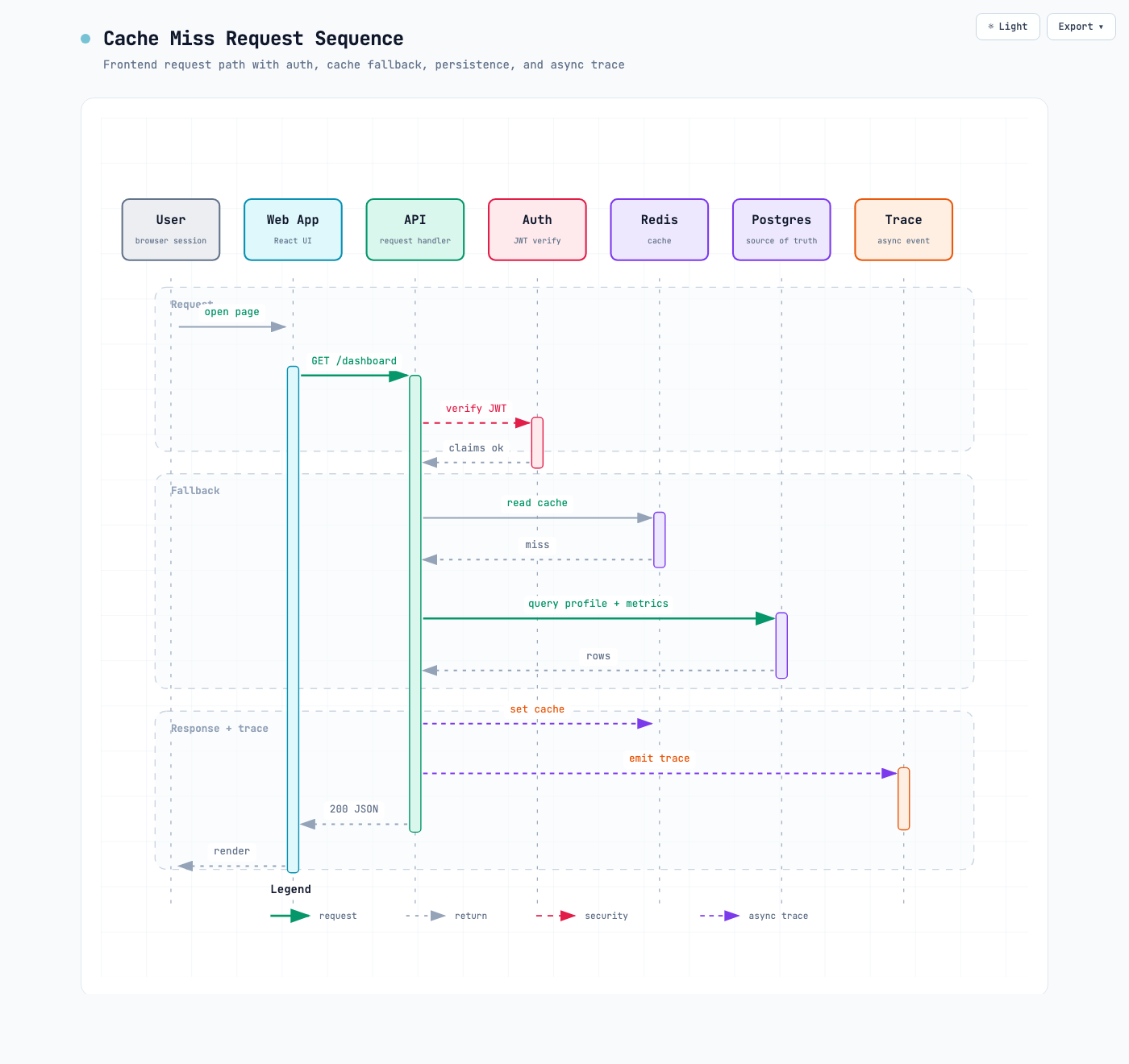
Sequence 聚焦一段随时间展开的交互。
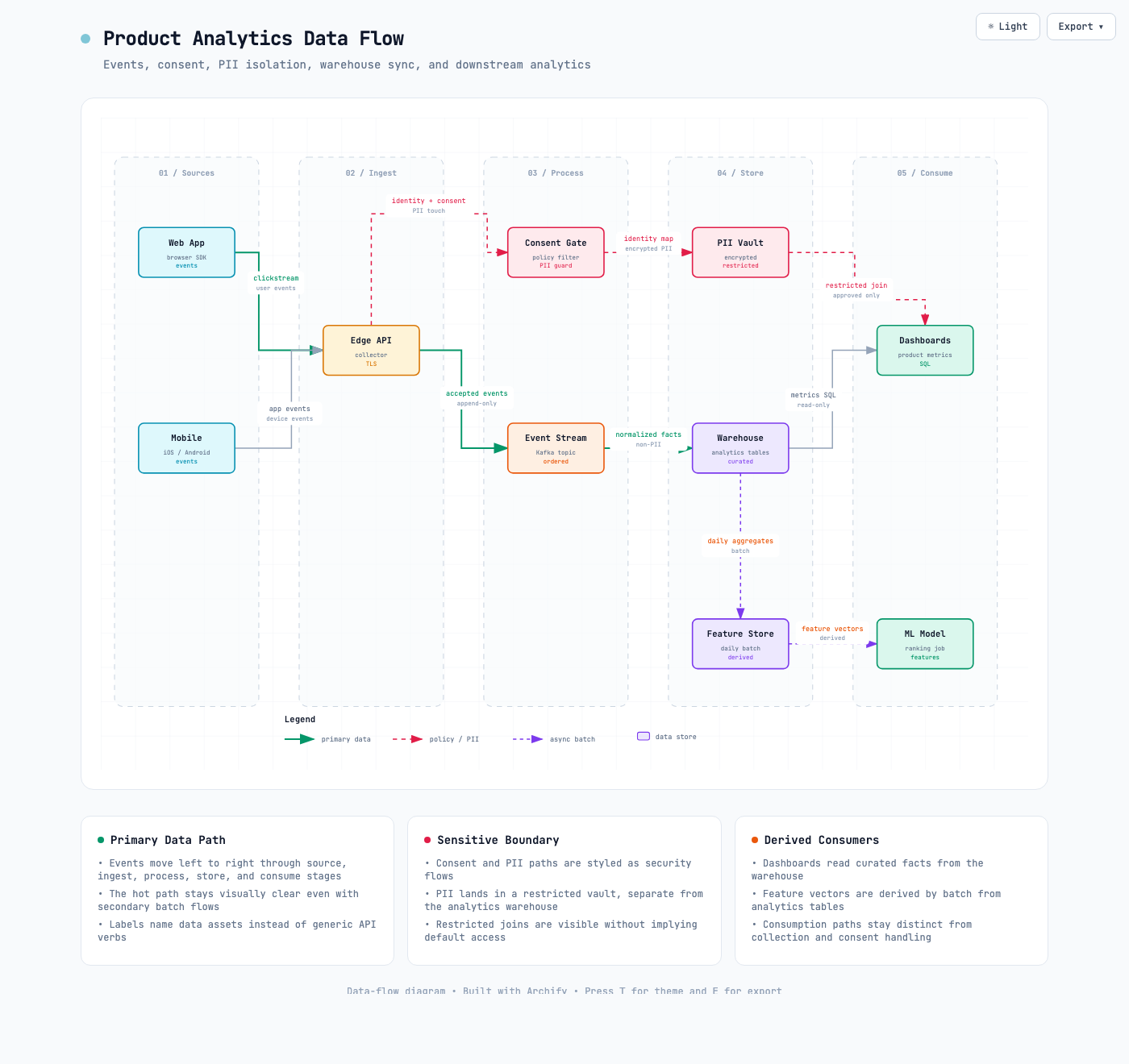
Data Flow 明确表现数据移动、转换以及敏感边界。
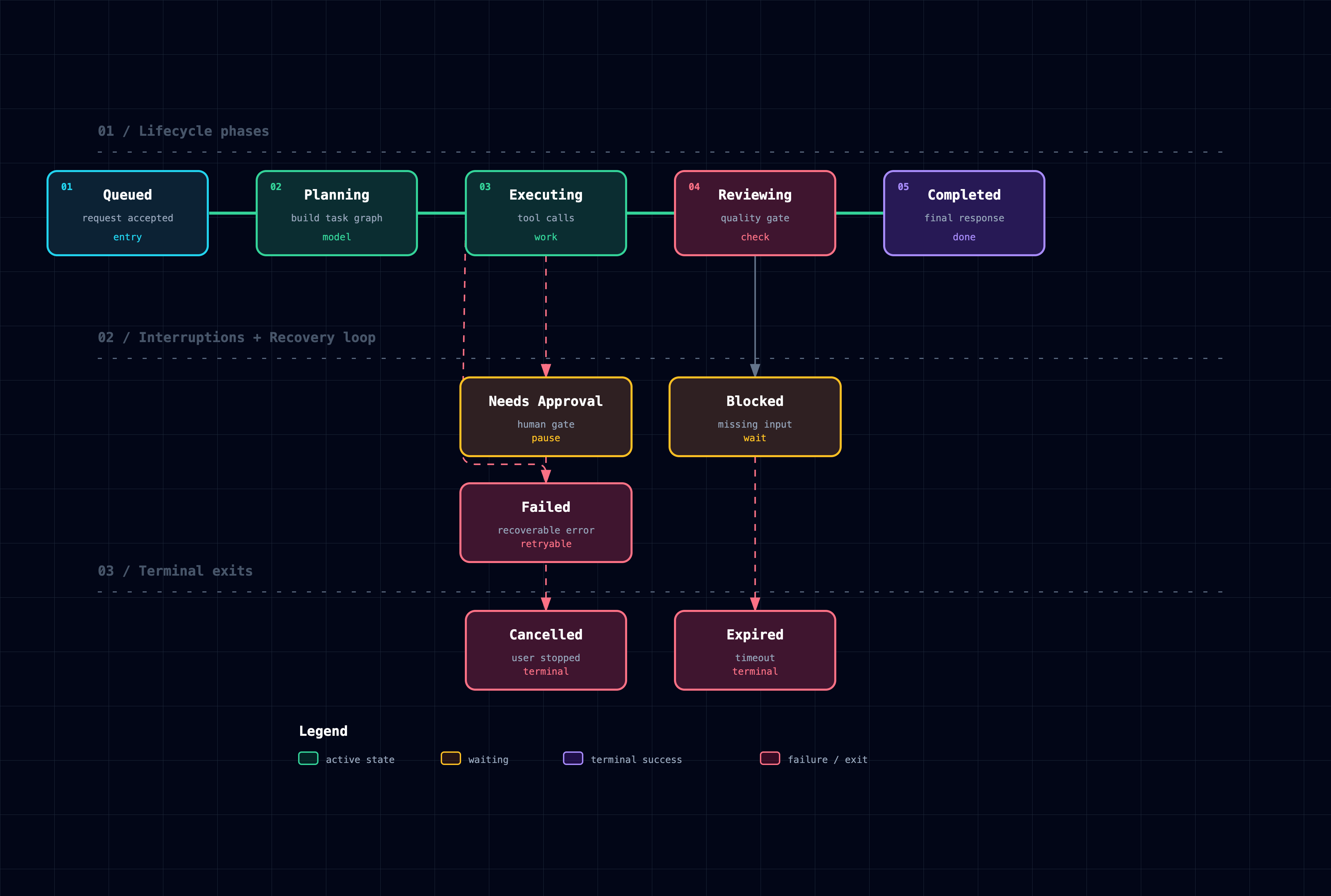
Lifecycle 区分正常进展、等待态、重试路径和终态。
为什么用 Archify
- 用布局判断代替通用自动布局 —— Agent 根据要讲的故事决定层级、间距、线路和视觉重点。
- Typed JSON IR —— 五种图都由对应 Schema 和 Renderer 驱动。
- 交付前验证 —— Schema、布局、HTML 和 SVG 检查会尽早发现结构错误和明显的可读性问题。
- 便于分享 —— 一个 HTML 文件即可打开,无需服务器或前端框架;外部字体不可用时会使用本地字体。
- 语义技术标签 ——
postgres、redis、aws.lambda、github-actions等名称会参与视觉分类,不需要沉重的图标运行时。
Archify 不是通用绘图编辑器,也不是 Mermaid 换肤工具。它的目标是把技术意图编译成适合沟通的成品图。
安装方式
推荐直接使用:
npx skills add tt-a1i/archify -g同一个 archify.zip 也可以手动安装:
| 使用方式 | 安装位置或方法 | 能力 |
|---|---|---|
| Claude Code | ~/.claude/skills/ 或 .claude/skills/ | 完整 Renderer + 校验流程 |
| Codex CLI | ~/.agents/skills/ 或 .agents/skills/ | 完整 Renderer + 校验流程 |
| opencode | ~/.config/opencode/skills/、.opencode/skills/ 或 .agents/skills/ | 完整 Renderer + 校验流程 |
| Claude.ai | 在 Settings → Capabilities → Skills 上传 archify.zip | 取决于沙箱是否允许执行 Node.js |
| Project Knowledge | 把 archify.zip 上传到项目知识库 | 仅 Prompt 驱动的 Architecture 模式 |
Claude.ai 的 Skills 上传入口:
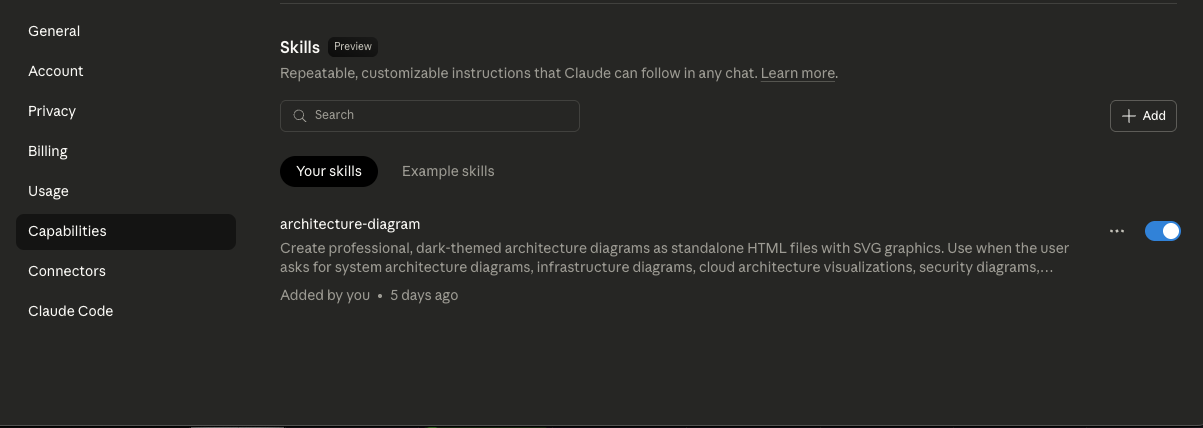
手动安装就是把压缩包解压到对应目录。分发包已包含独立校验器,不需要执行 npm install。
工作原理
Renderer 驱动的图会经过一条简短、可检查的流水线:
| 步骤 | 发生什么 |
|---|---|
| 生成 JSON IR | Agent 先生成类型化描述,而不是直接修改最终 SVG。 |
| 校验 | 内置独立校验器检查 Schema,无需安装运行时依赖。 |
| 渲染 | 对应 Renderer 生成 HTML/SVG。 |
| 检查 | 布局和 Artifact 检查发现无效坐标、损坏 SVG 和不安全线路。 |
| 迭代 | 修改集中在 JSON IR,尽量保持无关结构稳定。 |
从仓库源码运行 CLI:
cd archify
node bin/archify.mjs doctor
node bin/archify.mjs demo /tmp/archify-demo
node bin/archify.mjs render workflow examples/agent-tool-call.workflow.json /tmp/workflow.html
node bin/archify.mjs validate workflow examples/agent-tool-call.workflow.json --json
node bin/archify.mjs check /tmp/workflow.html
node bin/archify.mjs examples
演示场景可以选择开启轻量 Trace 动画:
{ "meta": { "title": "Release Flow", "animation": "trace" } }动画会遵循 prefers-reduced-motion。不设置 animation 时保持静态。
使用生成结果
在现代浏览器中打开 HTML,右上角提供两个入口:
- Theme —— 切换深色和浅色,快捷键 <kbd>T</kbd>。
- Export —— 复制 PNG,或下载 PNG、JPEG、WebP、SVG,快捷键 <kbd>E</kbd>。
| 格式 | 适合 |
|---|---|
| 复制 PNG | 飞书、Slack、Notion、GitHub 评论和快速评审 |
| PNG / JPEG / WebP | 演示文稿、文档、网站和印刷 |
| SVG | README、博客、Figma、Illustrator 和无损缩放 |
位图会以浏览器允许的最高安全分辨率原生渲染,最高 4×。图太大时会自动降到 3× 或 2×,避免超过 Canvas 限制。
导出的 SVG 同时包含深色、浅色变量和 prefers-color-scheme,因此同一个文件可以跟随读者的系统主题。
常用 URL 参数:
?theme=light或?theme=dark—— 固定初始主题。?openExport=1—— 加载后自动打开导出菜单。
WebP 和剪贴板能力取决于浏览器。外部字体不可用时,HTML 会使用本地字体 fallback。
Prompt 模板
仓库概览
梳理这个仓库的运行时架构,最多保留 12 个核心组件。
展示主要请求路径、外部系统和信任边界,把实现细节放进说明卡片。
CI/CD Workflow
画一张 CI/CD workflow:pull request -> tests -> approval -> build image ->
staging -> smoke test -> production。把 rollback 画成次要失败路径。
数据血缘
画一张从 Web、Mobile 事件经过 Consent Gate、Kafka、Warehouse、Feature Store,
最终到 Dashboard 和 ML 消费方的数据流图,并明确标出 PII 边界。
参考
语义标签会参与颜色和分组:
| 示例 | 类别 |
|---|---|
react、nextjs、ios、browser | 前端 |
node、go-service、python-worker、api-gateway | 后端 |
postgres、redis、s3、bigquery、snowflake | 数据和存储 |
aws.lambda、gcp.pubsub、azure.functions、kubernetes | 云与基础设施 |
auth0、oauth、vault、security-group | 安全 |
kafka、rabbitmq、sqs、nats | 消息系统 |
stripe、github-actions、openai、slack | 外部系统 |
Renderer 输入请查看 Schema 说明,版本历史请查看 CHANGELOG.md。
当前状态与路线图
Archify 2.10 的五种 Renderer 模式都已经使用 Typed JSON IR。接下来的重点是稳定局部修改、改善布局诊断,并让生成结果更容易检查和分享。
规划和产品边界请查看 ROADMAP.md。自动 Mermaid Parser、通用自动布局、托管分享服务和 WYSIWYG 编辑器目前都不是目标。
致谢
Archify 基于 Cocoon AI 的 Cocoon-AI/architecture-diagram-generator v1.0 进行 Fork 和重写。
原项目的视觉语言仍归功于 Cocoon AI。Archify 2.x 在其基础上增加了主题、导出、Typed Renderer、校验、无障碍支持和统一 CLI。两个项目都采用 MIT License。
License
MIT —— 可以自由使用、修改和分发。
参与贡献
欢迎提交 Issue、Pull Request 和分享生成的图。报告产物问题时,请尽量附上 Prompt、图表类型和 Archify 版本。
<p align="center"> <strong>English</strong> · <a href="./README_ZH.md">简体中文</a> </p>
<p align="center"> <a href="https://trendshift.io/repositories/31352?utm_source=repository-badge&utm_medium=badge&utm_campaign=badge-repository-31352" target="_blank" rel="noopener noreferrer"><img src="https://trendshift.io/api/badge/repositories/31352" alt="Archify on Trendshift" width="250" height="55"/></a> </p>
Archify
Generate beautiful architecture, technical workflow, sequence, data-flow, and lifecycle diagrams in chat. Switch dark / light. Copy to clipboard or export crisp up-to-4× PNG / JPEG / WebP / SVG.
Archify is an agent skill for Claude, Codex CLI, and opencode. It turns a plain-English description of your system or process into a polished, self-contained technical diagram — a single HTML file you can open, toggle themes on, copy to the clipboard, and export at maximum resolution.
- No design skills needed — describe your architecture in English, get a diagram
- Workflow, sequence, data-flow, and lifecycle diagrams too — technical flows, approvals, tool calls, CI/CD, runbooks, request call chains, data pipelines, PII boundaries, and state machines can be drawn
- Built-in theme toggle — one click between dark and light, persists across sessions
- Copy PNG to clipboard — one click, paste straight into Slack / Notion / GitHub
- Ultra-crisp image export — PNG / JPEG / WebP rendered natively at up to 4× source resolution (no upsampling blur), or SVG for true vector
- SVG follows system dark/light — exported SVGs ship with both variable sets +
@media (prefers-color-scheme), so dropping one into a GitHub README makes it follow the reader's color preference (no more two PNGs wrapped in<picture>) - Validation loop built in — renderer-backed diagrams go through JSON schema validation, layout checks, HTML/SVG artifact checks, and targeted iteration
- Semantic tech labels — describe components as
aws.lambda,postgres,redis,github-actions,openai, etc.; Archify maps them to the right visual category without needing a full icon library - Self-contained HTML — the generated file has zero dependencies, share by sending it
- Iterate by chat — "add Redis", "move auth to the left", "use emerald for the API"
Project page: tt-a1i.github.io/archify
Start in 60 seconds:
npx skills add tt-a1i/archify -gThen ask your agent: Use archify to map this repository's runtime architecture.
Preview
Same diagram, two themes, one click to switch:
| Dark | Light |
|---|---|
| |
The Export menu — Copy PNG to clipboard plus 4 download formats (all raster exports at up to 4× source resolution):
Example file: examples/web-app.html. Download or clone the repository, open the file locally, then press <kbd>T</kbd> to toggle themes or <kbd>E</kbd> to open Export.
Quick start
1. Install
npx skills add tt-a1i/archify -gThis installs Archify for supported agents through the open-source skills CLI.
To try it without a permanent install:
npx skills use tt-a1i/archify@archify --agent codexReplace codex with claude-code or opencode when needed.
2. Ask for one clear view
Start with an overview instead of asking one diagram to explain the entire repository:
Analyze this repository, then use archify to create a high-level runtime architecture diagram.
Show 8–12 core components, one primary request or data path, external dependencies, and trust boundaries.
Put supporting detail in cards instead of adding more edges.
For a focused flow:
Use archify to draw this login flow: Browser -> Web App -> API -> JWT validation ->
Redis session lookup -> PostgreSQL fallback. Make the cache-miss path secondary.
3. Refine in chat
Ask for focused changes such as add Redis, move auth to the left, or highlight the rollback path while the source JSON remains available in the session.
Archify returns a self-contained HTML file that opens in any modern browser and exports to PNG, JPEG, WebP, or SVG.
Diagram types
Choose the view that matches the question you need to answer:
| Type | Best for | Include in your prompt |
|---|---|---|
| Architecture | Components, services, storage, boundaries | Scope, core components, primary path |
| Workflow | CI/CD, approvals, tool calls, runbooks | Participants, order, branches, exceptions |
| Sequence | API calls, cache fallback, auth, async traces | Callers, callees, returns, timing |
| Data Flow | Pipelines, lineage, PII, downstream consumers | Sources, transforms, stores, boundaries |
| Lifecycle | State machines, retries, waits, terminal states | States, events, retry and cancellation paths |
Architecture examples:
examples/web-app.html— compact SaaS architectureexamples/archify-repo.html— Archify's skill → JSON IR → renderer pipelineexamples/archify-repo-grid.html— explicitrow/colgrid placementexamples/maka-architecture.html— a third-party desktop agent workbench
Workflow uses swimlanes, a clear happy path, and restrained secondary branches.
Sequence focuses on one interaction over time.
Data Flow makes movement, transformation, and sensitivity boundaries explicit.
Lifecycle separates normal progress, wait states, retries, and terminal outcomes.
Why Archify
- Layout judgment over generic auto-layout — the agent chooses hierarchy, spacing, routes, and emphasis for the story being told.
- Typed JSON IR — architecture, workflow, sequence, data-flow, and lifecycle diagrams use renderer-backed schemas.
- Validation before delivery — schema, layout, HTML, and SVG checks catch malformed or unreadable output early.
- Portable output — one HTML file, no server or framework required, with local font fallbacks when external fonts are unavailable.
- Semantic technology labels — names such as
postgres,redis,aws.lambda, andgithub-actionsguide visual categorization without a heavyweight icon runtime.
Archify is not a general-purpose drawing editor or a Mermaid theme. Its job is to turn technical intent into a polished communication artifact.
Installation options
The primary installation command is:
npx skills add tt-a1i/archify -gThe same archify.zip can also be installed manually:
| Surface | Install location or method | Capability |
|---|---|---|
| Claude Code | ~/.claude/skills/ or .claude/skills/ | Full renderer + validation workflow |
| Codex CLI | ~/.agents/skills/ or .agents/skills/ | Full renderer + validation workflow |
| opencode | ~/.config/opencode/skills/, .opencode/skills/, or .agents/skills/ | Full renderer + validation workflow |
| Claude.ai | Upload archify.zip under Settings → Capabilities → Skills | Depends on Node.js access in the sandbox |
| Project Knowledge | Upload archify.zip to the project | Prompt-driven architecture mode only |
Manual installation means unzipping the archive into the matching directory. No npm install is required for the packaged skill.
How it works
Renderer-backed diagrams follow a small, inspectable loop:
| Step | What happens |
|---|---|
| Generate JSON IR | The agent creates a typed description instead of hand-editing final SVG markup. |
| Validate | Bundled standalone validators check the schema without installing runtime dependencies. |
| Render | The selected renderer produces the HTML/SVG artifact. |
| Check | Layout and artifact checks catch invalid coordinates, malformed SVG, and unsafe routes. |
| Iterate | Targeted changes are applied to the JSON IR while unrelated structure stays stable. |
The packaged CLI exposes the same workflow. From a repository checkout:
cd archify
node bin/archify.mjs doctor
node bin/archify.mjs demo /tmp/archify-demo
node bin/archify.mjs render workflow examples/agent-tool-call.workflow.json /tmp/workflow.html
node bin/archify.mjs validate workflow examples/agent-tool-call.workflow.json --json
node bin/archify.mjs check /tmp/workflow.html
node bin/archify.mjs examples
Optional trace animation can be enabled for demos:
{ "meta": { "title": "Release Flow", "animation": "trace" } }The animation respects prefers-reduced-motion. Omit animation for a static diagram.
Using the output
Open the generated HTML in a modern browser. The controls in the top-right provide:
- Theme — switch between dark and light. Shortcut: <kbd>T</kbd>.
- Export — copy PNG or download PNG, JPEG, WebP, or SVG. Shortcut: <kbd>E</kbd>.
| Format | Use it for |
|---|---|
| Copy PNG | Slack, Notion, GitHub comments, and quick reviews |
| PNG / JPEG / WebP | Slides, documents, websites, and print |
| SVG | READMEs, blogs, Figma, Illustrator, and lossless scaling |
Raster exports are rendered natively at the highest safe resolution, up to 4×. Oversized diagrams step down automatically to stay within browser canvas limits.
Exported SVGs include dark and light variables plus prefers-color-scheme, so one SVG can follow the reader's system theme.
Useful URL parameters:
?theme=lightor?theme=dark— force the starting theme.?openExport=1— open the Export menu on load.
WebP and clipboard support depend on browser capabilities. The HTML uses local font fallbacks when an external font cannot be loaded.
Prompt patterns
Repository overview
Map this repository's runtime architecture with no more than 12 core components.
Show the main request path, external systems, and trust boundaries. Move implementation detail into cards.
CI/CD workflow
Draw a CI/CD workflow: pull request -> tests -> approval -> build image -> staging ->
smoke test -> production. Show rollback as a secondary failure path.
Data lineage
Draw a data-flow diagram from Web and Mobile events through Consent Gate, Kafka,
Warehouse, and Feature Store to Dashboards and ML consumers. Mark the PII boundary.
Reference
Semantic labels guide color and grouping:
| Examples | Category |
|---|---|
react, nextjs, ios, browser | Frontend |
node, go-service, python-worker, api-gateway | Backend |
postgres, redis, s3, bigquery, snowflake | Data and storage |
aws.lambda, gcp.pubsub, azure.functions, kubernetes | Cloud and infrastructure |
auth0, oauth, vault, security-group | Security |
kafka, rabbitmq, sqs, nats | Messaging |
stripe, github-actions, openai, slack | External systems |
See the schema reference for renderer inputs and CHANGELOG.md for release history.
Current status and roadmap
Archify 2.10 already uses typed JSON IR across all five renderer-backed modes. Current work focuses on stabilizing local edits, improving layout diagnostics, and keeping generated artifacts easy to inspect and share.
See ROADMAP.md for planned work and design boundaries. Automatic Mermaid parsing, generic auto-layout, a hosted sharing service, and a WYSIWYG editor are not current goals.
Attribution
Archify is a fork and rewrite of Cocoon-AI/architecture-diagram-generator v1.0 by Cocoon AI.
The original visual language remains credited to that project. Archify 2.x adds themes, export tooling, typed renderers, validation, accessibility, and the unified CLI. Both projects use the MIT license.
License
MIT — free to use, modify, and distribute.
Contributing
Issues, pull requests, and shared diagrams are welcome. When reporting generated-output problems, include the prompt, diagram type, and Archify version when possible.